
EVANGELISTIC TABLETS
No Wifi Required!
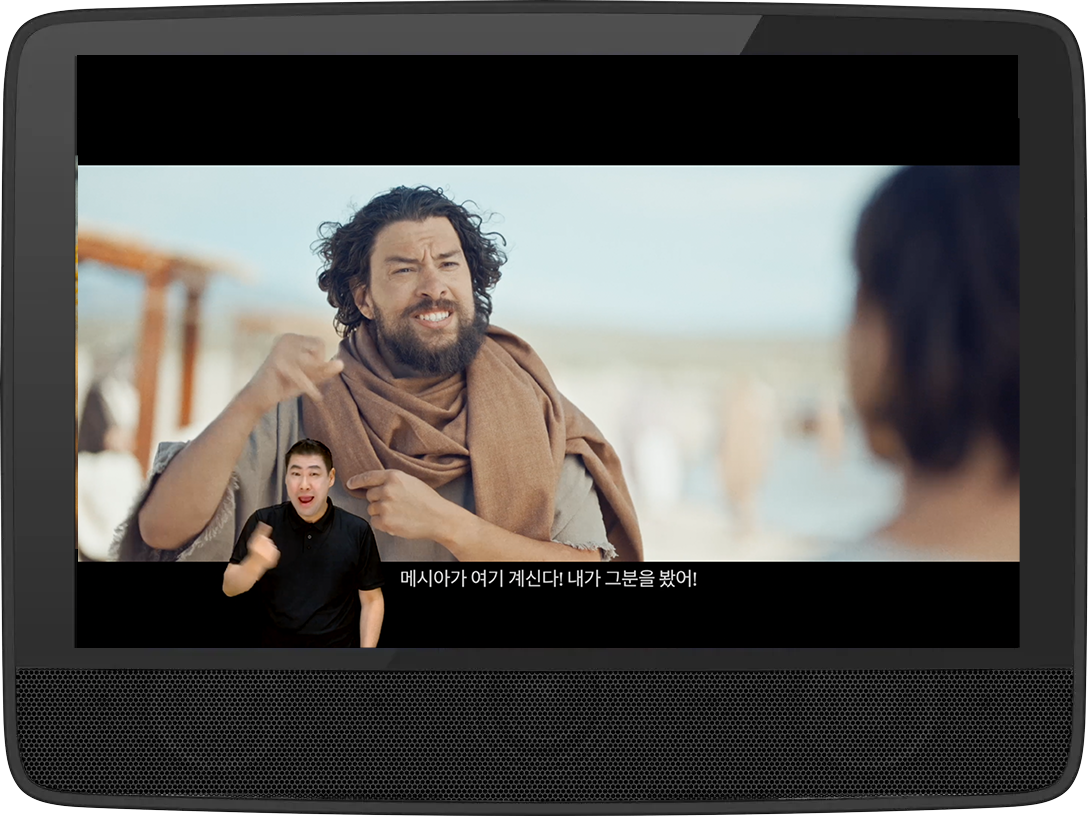

Deaf Missions has partnered with MegaVoice to place JESUS: a Deaf Missions film on secure tablets for Deaf leaders around the world — at no cost to them.
For many workers, even a modest device is out of reach. Through an application process, Deaf Missions sponsors tablets so Deaf believers can share the Gospel in their own communities.
$300 provides one MegaVoice Envision tablet, including shipping, staff coordination, and ongoing support.
Your gift places the story of Jesus directly into the hands of a Deaf leader — ready to be shared wherever and whenever God opens the door.
Sponsor a tablet today and equip a Deaf leader to share Christ!
SPONSOR A TABLET
APPLY FOR A FREE TABLET
MEGAVOICE TABLET SAMPLE
-
The most accessible, video-enabled multimedia player designed to share Scripture through audio, video, and images in hard-to-reach locations.
The Envision from MegaVoice brings us one step closer to seeing the Gospel in a new, accessible way for everyone, everywhere.
JESUS: a Deaf Missions film with options of heart sign languages and subtitles available to load onto the Envision. Users can experience the message like never before on Envision’s high-quality screen and through its dynamic audio.
Easily navigate the secure audio, video, and image content with the intuitive, icon-driven touch screen. This durable Envision is charged through a USB-C cable and can be paired with solar panels and a backup battery, allowing Partners to reach previously unreached areas.
-
General:
Video playback
Audio playback
Document viewer (initially only PDF)
Image viewer
Image slideshow
10.1” (1280 x 800 pixels) IPS display with capacitive touch functionality
Power/display on/off combo button
Two built-in, front-facing speakers
Reset button
Connectivity:
3.5mm stereo earphone jack
USB-C (charge and connectivity)
USB-A (OTG) port
MicroSD port1
Supports video output over mini-HDMI connector (adaptor cable included)
Graphical Indications:
Charge
Battery capacity
Volume level + mute
Brightness level
Connected/selected storage(s)
Display/audio connection and output
Brightness and volume controls
Display output controls
Media Browsers:
Audio (AAC, M4A, MP3, OGG, WAV)
Video (AVI, FLV, M4V, MKV, MOV, MPG, MP4)
Images (BMP, GIF, JPG, PNG, MVI)
Documents (PDF)
Navigation Control:
Previous/next page (image/video/audio)
First/last page (documents only)
Skip 15 seconds forward/backwards (audio/video)
Play/pause (audio/video/slideshow)
Rotate (image/document)
Zoom in/out (image/document)
Fit to display (image/document)
Shuffle (audio/video/slideshow)
Repeat one/all (audio/video)
Bookmarks:
Display orientation (image/document)
Path to last accessed file, per media browser
Last viewed page (document)
Last playback position (audio/video)
Headings multilevel list (document)
Storage:
Internal available in 32GB, 64GB or 128GB (per MOQ / stock availability)
External – any standard microSD/OTG up to 128GB1
Battery:
10,000mAh built-in Li-Ion battery
Charge indication LED
Average play time: 6h 7m @ max volume and brightness2
Typical charge time: 6h 30m3
Security:
Internal storage: – Access via USB – requires SLS-v2 cable from MV – Encryption – optional. Supports both encrypted and non-encrypted content
External storages: (microSD / OTG) – Access via USB – any USB cable (microSD only) – Encryption – required!
Size:
260 x 190 x 28mm / 800g
10.2 x 7.5 x 1.1” / 28.22oz
Multi filesystem support: (NTFS, FAT32, exFAT)System information screenAutomatic and interactive firmware updateBuilt-in test screens (display, audio, touch)
-
Battery
Internal battery: 10,000mAh Lithium Ion
Average play time: 6h 7m @ max volume and brightness2
Typical charge time: 6h 30m3
Charge indicator: On-screen and LED
Charging
With proper care, the player’s Lithium-Ion battery should perform well for several years. When shipped, the battery is only partially charged. You can easily charge the player using one of the methods below.
External Power Supply
For fastest charge use a regulated 5V – 2000mA (or higher) USB charger4, 5, or an equivalent Power Bank4, 5, connected to the USB-C port on the back of the Envision. A compatible solar panel4, 5 may also be used.
Computer
Connect the tablet from any standard computer USB port to the USB-C port on the back of the Envision until the charging icon stops blinking4, 6.
*MANY FACTORS INFLUENCE TYPICAL BATTERY PLAYTIME, CHARGE RETENTION AND LIFE. ALL TIMES LISTED ARE BEST-CASE ESTIMATES BASED UPON USE UNDER NORMAL CONDITIONS.
1 MICROSD CARD NOT INCLUDED
2 YOUR PLAYTIME MAY VARY
3 ACTUAL CHARGE TIME WILL VARY ACCORDING TO THE CURRENT BATTERY CAPACITY AND CHARGING SOURCE
4 POWER BANK AND SOLAR PANEL NOT INCLUDED
5 A SOLAR PANEL IS THE LEAST STABLE/RELIABLE AMONG THE OPTIONS ABOVE
6 MOST COMPUTER STANDARD USB PORTS PROVIDE A LIMITED POWER OUTPUT OF ONLY AROUND 500MA. USB-C PORTS MAY SUPPLY HIGHER POWER OUTPUTS